
OBS Studio
Discover how OBS Studio for Linux delivers professional-grade video recording and live streaming. Read our comprehensive editorial review and feature guide.
Unmatched Customization in Open-Source Broadcasting
Unlike restrictive, commercial streaming suites, OBS Studio live streaming and recording software offers complete, unrestricted creative control over your digital broadcasts. Developed by the OBS Project, this powerful open-source utility has become the industry standard for Linux users who require high-performance video capturing and modular interface design without the burden of licensing fees.
Real-Time Capture and Professional Mixing
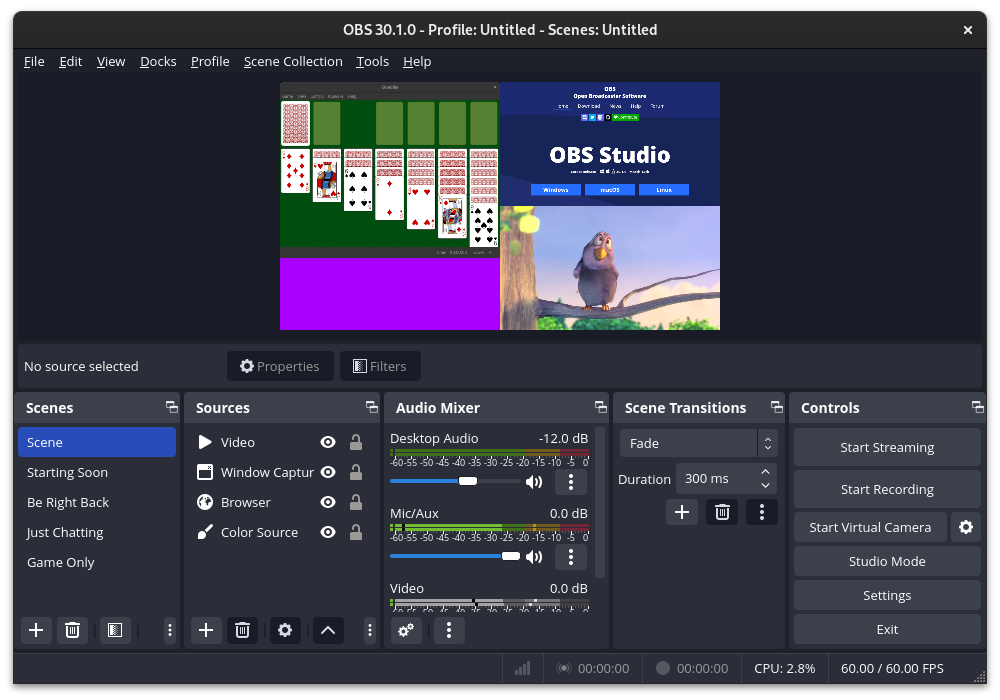
At the core of the experience is a high-performance real-time video and audio capturing engine. Users can build complex visual environments by combining multiple input sources, including:
- Individual application window captures
- Webcams, capture cards, and hardware inputs
- Static images, formatted text, and dynamic browser windows
With support for an unlimited number of custom scenes, you can transition between layouts seamlessly using bespoke stinger videos or clean, built-in transition effects.
Granular Audio Engineering
Great video is nothing without pristine audio. The platform features an intuitive multi-channel audio mixer equipped with per-source filters. Users can easily deploy noise gates, noise suppression, and gain adjustments directly within the software. For advanced creators, native VST plugin support allows you to integrate your favorite virtual studio technologies to polish your sound to perfection.
The Power of Studio Mode and Multiview
To eliminate mistakes during live broadcasts, the built-in Studio Mode lets you preview and adjust your scenes behind the scenes before pushing them live to your audience. When managing complex productions, the Multiview feature provides a high-level overview of up to eight different scenes, allowing you to transition to any of them with a simple double-click.
Tailored for the Linux Ecosystem
As an entertainment and utility application built with open-source principles, it integrates beautifully into Linux environments. The modular 'Dock' user interface allows broadcasters to detach, rearrange, and customize the placement of every control panel, ensuring your workspace matches your exact production workflow.
Get Started with Professional Broadcasting
If you are ready to elevate your content creation, this software provides the ultimate toolkit for both live broadcasters and offline video editors. To explore this powerful application, head over to the official Flathub store page to download and experience OBS Studio live streaming and recording on your Linux system.